Simcad Pro® · Simcad DT®

3D Simulation Modeling & Analysis

The Most Scalable and User-Friendly Data-Driven Simulation Software.

Digital Twin Simulation · Modeling and Optimization · Virtual Reality · Physics

Simcad® lets you visualize, analyze and optimize process flow systems in an interactive 2D/3D/VR simulation modeling environment. Plan, optimize, and re-arrange processes and procedures while optimizing layouts, facility improvement, automation and scheduling. Simcad® integrates live and historical data to provide the most effective simulation tool on the market.

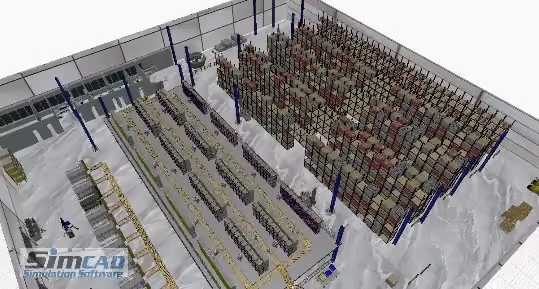
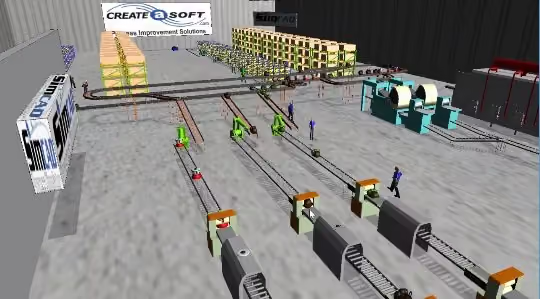
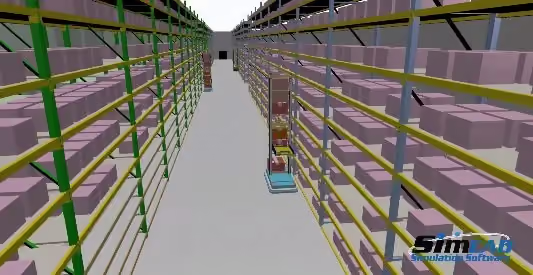
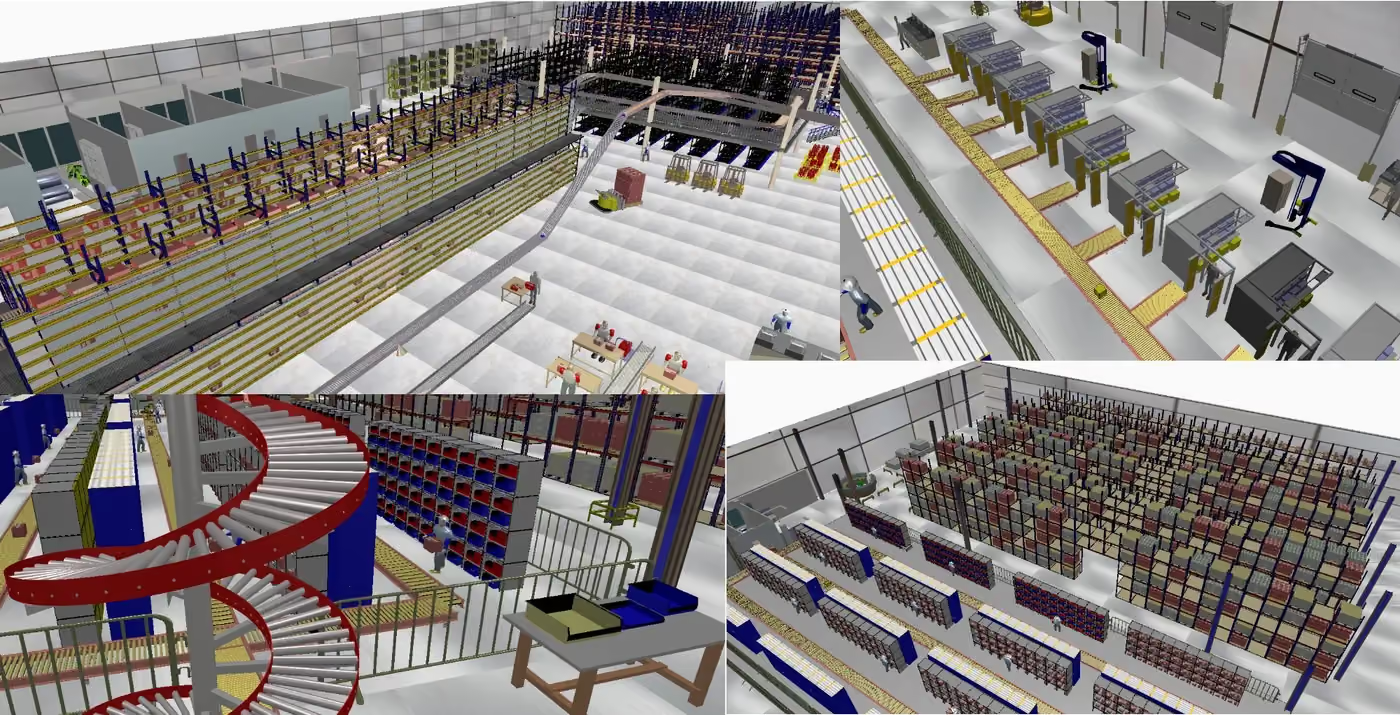
Four Simcad Pro 3D simulation views: warehouse racking, conveyor lines, a spiral conveyor and a manufacturing floor

Simulation, Modeling, Optimization and Visualization

Simcad Simulation Software isn’t just flexible — it’s one of the most powerful and customizable simulation software available today. Quickly design and build models using the intuitive graphical interface, then easily customize logic and interactions with simple Visual Basic commands. Effortlessly handle large datasets with the built-in database engine, ensuring your simulations run smoothly and accurately.

With a rich library of customizable modules and assets, you can visualize every detail — bringing your model to life with dynamic animations, from basic movements to highly complex processes. Simcad Simulation Software lets you design, optimize, and animate faster than ever, giving you the power to solve challenges and drive results with confidence.

Capabilities

Five pillars of the Simcad® engine

Everything below ships in the Simcad® set — no per-feature modules to bolt on later.

Technology

Multi-Threaded 64-bit Engine

Patented, Multi-Threaded, 64-bit Simulation engine designed to Speed Up Modeling & Analysis.

  • Utilizing the latest technology, Simcad® Simulation Engine supports large simulation models, and unlimited data sets
  • Faster simulation runs utilizing all the processing power of your PC
  • Simcad® on-the-fly simulation — make real-time changes to the model while the simulation is running
  • Validate the model development while the simulation is running — shorter model development cycle, faster analysis
  • Interactive optimization and model changes during the run provide increased understanding of model behavior
  • Real-time connectivity to data systems while the simulation is running
Visualization

Advanced Visualization with Simcad Simulation Software®

2D, 3D, & VR with Detailed Animation using Simcad's Singular Model Building Technology.

  • Automatically animate the model in 2D, 3D and Virtual Reality with ray tracing, light effect, and shadows
  • Display detailed animation of any station during the simulation run
  • Fully interactive VR integration provides live walk-through within the model while the simulation is running
  • On-the-fly interaction enables you to make changes and visualize their effects in real time — no pausing, no waiting, no re-starting
  • Extensive support for external 2D and 3D file formats
  • Unlimited dashboard support in all views
  • Singular model building environment — build your model and view constraints, process flow, manpower allocation, and animation in one interface

Analytics

Spaghetti Diagrams, Congestion Analysis, Heat Maps, Efficiency and OEE

Real-time Dashboards, Scenario Analysis and Comparison, Dynamic Reporting and Graphs.

  • Extensive reporting and analysis tools
  • Built-in Scenario Analyzer tool with full graphing capability, interval analysis, variability and case analysis
  • Dynamically generated Value Stream Map and analysis
  • Custom Data Visualizer and Reporting
  • Analyze and compare model variability
  • Hover reporting capability per object
  • Generate data distributions for all computed parameters
  • Simulation data-reset eliminates the effect of "warm-up" time
  • Load current state data for improved predictive analytics

Lean Analysis

Dynamic Value Stream Mapping

Built-In Lean Analysis and Dynamic Value Stream Mapping.

Dynamically generate Value Stream Maps from the simulation model. By building a 2D or 3D representation of the operation, Simcad® dynamically generates the resulting value stream map.

  • Create, modify and generate Value Stream Maps
  • Value Stream Map content is dynamically updated from the simulation model
  • Changes to the model constraints impact the Value Stream Map displays
  • Analyze and compare model variability
  • Compare actuals vs generated Value Stream values
  • Export generated Value Stream Maps to PDF
  • Display Value Stream maps on top of the CAD layout, or in standard format
  • Display spaghetti diagrams and congestion diagrams
  • Auto-compute all OEE, efficiencies, value-added time and non-value-added time
  • Compute efficiency of each product production cycle based on BOM
  • Analyze and generate product families based on routing

Additional Capabilities

Additional Features with Simcad®

Smart, Spatially Aware Agents, Sub-Flows, Collision Avoidance and Real-Time Connectivity.

  • Connect in real time to unlimited external data systems
  • Sub-flows and model layering allow for unlimited detail within the model
  • Forecast product and equipment lifecycle with predictive analytics
  • Support for spatially aware models
  • Spatially aware smart entities accurately mimic human & robot behavior
  • Includes collision detection and avoidance
  • Support for smart agents and discrete pathed entities
  • Integrated physics engine
  • Integrated Neural Network Optimizer — learns from the model, generates faster optimization
  • Integrated Schedule Optimizer
  • Support for Monte Carlo runs, model variability, shifts, distribution fitting and more

Videos & images

Simcad® in motion

Recovered simulation footage — nothing loads until you press play.

  • Warehouse and manufacturing simulation — video poster
    Warehouse and manufacturing simulation

    Warehouse and manufacturing simulation

  • AMR robot moving boxes to rack — video poster
    AMR robot moving boxes to rack

    AMR robot moving boxes to rack

  • Warehouse simulation model — video poster
    Warehouse simulation model

    Warehouse simulation model

  • Simcad Pro overview — video poster
    Simcad Pro overview

    Simcad Pro overview

  • Simcad Pro 3D model of a dynamic warehouse with racking and picking aisles
  • Simcad Pro 3D model of a manufacturing robot cell
  • Simcad Pro 3D model of a pick-and-place robot station

Testimonials

Clients on implementing Simcad® Simulation Software

26 reviews recovered from Simcad users across warehousing, manufacturing, healthcare, automation and consulting.

Filter testimonials by industry

Showing all 26 testimonials.

  • Excellent product with continuous innovation

    We used Simcad for warehouse simulation. The software is super powerful in data exchange and data analysis. It thoroughly reveals the pattern behind the warehouse operation. With scenario manger, you can compare different solutions and make a decision easily by comparing the key metrics and KPI that you care.
    Ziping X.Solutions Engineer, Warehousing · Geodis
  • Simulation for Dummies

    Using the software is pretty simple. The online tutorials get you started in the right direction and keeps things simple. Each step of the build phase is easy and requires very little knowledge of how to write code.
    Tony R.Project Engineer, Automotive · Plastic Omnium
  • Very powerful software

    The ability to customize practically every aspect of the software. There is always a way to implement what you have in your mind using the endless options.
    Tyler H.Student, Education Management · City of Edmonton
  • Very Capable Process and Equipment Simulation Tool

    Simcad provides an appropriate level of 3D visualization tools to represent the equipment and processes being simulated while backing it with very capable data importing, data manipulation, and data reporting tools.
    David C.Business Development Manager, Logistics and Supply Chain · Invar Systems
  • Simcad Pro is fast and easy

    First manufacturing simulation was quick and easy. Had a nice complex model done in less than a day. The software is easy to get started. You don't have to know a lot of coding to make it work for you. I only got the 2 days of training. I would have paid for more in hindsight. I will arrange more!! Trainer was great!
    Matt H.Value Stream Manager - Operations Automotive · Hunter Engineering
  • Experience with Simcad Pro Health

    We have found the software to be extremely flexible and powerful - and have yet to encounter a situation that it is unable to accurately handle. The ability to fully model real-world variation has tremendous value over the use of spreadsheets or making decisions based on averages. The technical support from the company has been excellent which has been important in order to take full advantage of the capabilities. Finally, it is useful to be able to model individual steps in a system at whatever level of detail is needed for the analysis being performed.
    Jack R.Director, Process Improvement, Hospital & Health Care · Healthcare
  • Multi-Purpose Advantages

    It's so versatile - we use Simcad Pro for modeling & capacity planning, virtual simulated work environment for training, and we also plan to use if for design and proof of concept. There are so many advantages to having such a dynamic tool at our disposal.
    Sarah N.Senior Associate, Professional Training & Coaching · Solomon EOS, LLC
  • SimCAD Pro is a great value, with excellent customer support, and easy to use for the average person

    Drop and drag technology is much simpler to use, coding is optional, great graphics and metrics to display your results, Monte Carlo tool is very helpful from numerous runs, and the value stream mapping feature is also an advantage. SimCAD Pro is simple connect to Microsoft Access and Excel files, has an abundance of analysis tools to extract data and identify issues, and the option to create 3D graphics for customer visibility is top notch. Additionally, this software has an incredible value and versatile functionality compared to other software programs that are grueling to program, cumbersome to use, and expensive to train employees.
    Jason S.Industrial Engineer, Unspecified · Northrop Grumman
  • SimCad Health Care

    the overall experience is great I am especially impress with the support for any issues and the help you receive from the corporate office. I like the fact that you can design it to what you need and that you can customize the process to your work flow.
    James W.Senior Clinical Analyst | Emergency Services, Hospital & Health Care · HCA
  • New automation welding line design for a major automotive manufacturer

    Drop and drag technology is much simpler to use, coding is optional, great graphics and metrics to display your results, we have used Simcad Pro to design a new welding line with multiple specialized welders along with additional automation to load the line, clean and paint welded components. The line also included a number of robot to handle the part and a tray recovery and recirculation with cleaning. Simcad Pro helped us identify the proper buffer sizes to get the highest throughout of the welders (most expensive), identify the speed of the conveyors at different sections, and the proper sequencing logic needed to drive the system. We extensively used the built in scenario analyzer in order to determine the best solution. With down time and failure rate of each piece of equipment entered we were able to identify the proper OEE for the system. Model was presented in 2D and 3D with full animation.
    Radwan M.General Manager, Machinery · ProBeam USA
  • Experience with Simcad Pro Health

    Overall, we have really enjoyed working with the CAS staff and have used the SW for multiple space planning projects (with a number of projects in que). The SW is pretty easy to use (particularly for standard functions) and very well supported. The CAS staff are very responsive, knowledgeable, and friendly.
    Caitlin S.Senior Planning Analyst, Hospital & Health Care · The University of Kansas Health System
  • Simcad Pro Elite was used for the analysis and optimization of a regional distribution center

    . Using the interactive modeling capability we were able to quickly identify the optimal layout along with the required design changes. Optimization of processing behavior in receiving and put away was also a focus of the model. Our first project with Simcad Pro Elite yielded an initial return on investment of 900% along with ongoing yearly savings and a reduction of time required for receiving and put away by 50%.
    Fortune100 Direct to Consumer Company
  • Utilizing Simcad for optimizing production schedules enabled us to achieve a reduction in lead time of 42%

    . The nature of our product is very variable and job priority constantly fluctuates. After working with other simulation tools it was beyond frustrating trying to update the model based on connectivity to SAP and real-time shop floor data. Simcad Pro enabled for us to achieve optimal scheduling of rush, and jobs with changing priorities through the interaction with SAP and shop floor controls. The integrated connectivity was a joy to work with as I am not a programmer or database expert.
    National SecuritySolutions Provider
  • Selecting Simcad Pro as our choice for AGV simulation was confirmed after our first project

    . With an initial cost avoidance of $500,000 along with ongoing increases in efficiency and additional throughput gains of 20% it was clear that Simcad Pro was the right choice.
    Global FoodProduction Company
  • Tasked with having to design a layout for a set of new work cells I explored many of the 3D simulation tools available on the market and found that I didn’t really want to build a 3D model and then have to define flow-charts, paths, networks, and other confusing model constructs. With Simcad Pro I found that the modeling experience did not require me to work in multiple different views as everything was in one easy to work with interactive 3D environment. This made the 3D visual aspect very easy to identify but, more importantly, the optimal logic and behavior required to achieve the necessary throughput was quickly defined using the dynamic modeling capability of Simcad Pro.
    Independent ContractManufacturing Consultant
  • We worked with a major automation company and were given a $1,000,000+ proposal for new equipment. One of our corporate managers had doubts as to whether the proposed system could meet our throughput requirements. The automation vendor's analysis suggested that the system would meet our requirements (complete with 3D visualization and simulation of the solution). We decided to buy Simcad pro to validate the proposed system, and found that it was in fact not going to meet our needs.
    Regional DistributionFacility
  • For a non-engineer, I found the UI and building base process models easy to learn which made for a shorter learning curve. The interface is very easy to use and the drag a drop functionality helps you create models very quickly.
    Simcad ProUser
  • I look forward to working with Simcad Pro software and CreateASoft’s excellent support staff on future projects within MetalTek International -Wisconsin Centrifugal Division.
    MetalTekInternational
  • Not only did it allow [them] … to consider alternative processes quickly, but the animation allowed people on the assembly line to see their operation in action and understand the timing of the whole process.
    KilgoreFlares
  • I use Simcad Pro for capital equipment sales so I can’t carry around heavy automation and when a DVD can’t help a customer visualize how my automation will impact their business I can run a customer’s current state vs future automated state, with their actual data, over any time period. Not only is the ROI validated but the customer can see how fixing one process also impacts associated process i.e. additional savings and improvement.
    Dan/MTS, Inc
  • Using Simcad Pro, we were able to reveal exactly how bottlenecks resolved, and demonstrate how our implementation would provide the proper throughput required by our client. The total value of this project will exceed $1.8 Million - we now have the contract and purchase order.
    Automation TechnologiesIndustries
  • Visibility of the process. Once you have a working model it’s amazing how you can see things that you would have missed. Then you can quickly make changes to determine the best system improvements to make without spending any money! The visualization also makes it much easier to sell this to your potential customers.
    Gavin– SlewPro
  • The graphical interface and direct correlation of objects moving through the system using an image of the CAD representative cell is extremely helpful when explaining a process to our customers.
    JRAuto
  • Pre-sales simulation runs dramatically improve our ability to develop realistic proposals for our customers.
    AriesInnovation
  • The biggest benefit has been the ability to gain meaningful insights on the impact of system changes to resource utilization and flow through the facility. Factors that may have been overlooked such as bottlenecks or the true impact to resource utilization can be uncovered and visually displayed for others to see.
    Patrick- Process Design
  • I [also] really like the way the process extensions have been simplified to make incorporating logical statements into your model for advanced functionality manageable.
    Consultant, Simcad Pro Elite User

Are you ready to simulate with Simcad Pro®?

Start with the free Simcad Lite edition, or ask for a walkthrough against your own process data.

Or talk to us directly — (630) 851-9474 · Sales@CreateASoft.com

Free Simcad LiteRequest a Demo